

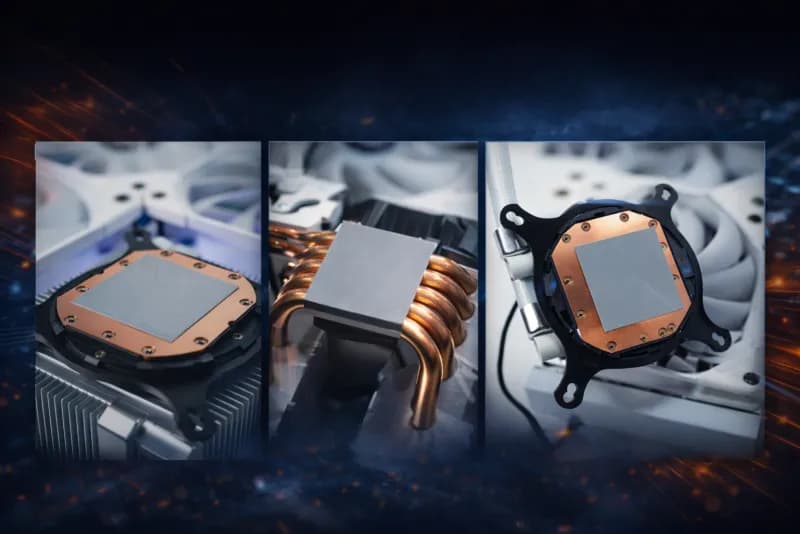
Honeywell PTM7950
Thermal Upgrade
The phase change thermal pad that keeps your device running cooler, quieter, and faster — for 5+ years.
Professional installation for laptops, desktops, and gaming consoles including Xbox & PS4.
Sound Familiar?
These are signs that your device's thermal paste has dried out or wasn't good enough to begin with. There's a better solution.
Honeywell PTM7950: The Phase Change Thermal Upgrade That Actually Works
Unlike regular thermal paste that dries out and loses effectiveness, PTM7950 is a phase change material that gets better as it heats up. It softens to fill every microscopic gap, creating the perfect thermal connection between your CPU/GPU and heatsink. Used by professional overclockers and PC enthusiasts worldwide, PTM7950 is the gold standard in thermal interface materials.
Softens and flows to fill every microscopic gap at operating temperature
Honeywell rated — 6.4 W/m·K independently verified by Igor's Lab
Thinner than any paste can achieve, compensating for lower raw conductivity
Stable through 1,000 hours at 150°C and 1,000 thermal cycles (-55°C to +125°C)
Volume resistivity: 2.1×10¹⁴ Ω·cm (non-conductive — zero short-circuit risk)
Why PTM7950 Is Essential for Laptops
The hidden problem that makes thermal paste fail in every laptop
The number one reason thermal paste fails in laptops is pump-out — a phenomenon where repeated thermal cycling causes paste to gradually migrate away from the processor die. Every time your laptop heats up and cools down, the expansion and contraction of components pushes thermal paste outward, creating voids and thin spots that drastically reduce cooling effectiveness.
Independent testing has shown that even premium pastes like Thermal Grizzly Kryonaut and Noctua NT-H1 can degrade within two weeks to six months on bare-die laptop processors — far shorter than the 2-3 year lifespan typically quoted for desktop applications. This is why your laptop runs hotter after just a year, even though the paste hasn't technically "dried out."
PTM7950 solves this problem by design. As a phase change material, it re-melts and re-solidifies with every thermal cycle, effectively refreshing itself each time your laptop heats up. Instead of being pushed away from the die, it flows back into position. Honeywell's own reliability testing confirms stable performance through 1,000 thermal cycles from -55°C to +125°C — conditions far more extreme than any laptop will ever experience.
This is why thermal professionals choose PTM7950 for laptops over pastes with higher raw thermal conductivity. A paste rated at 12 W/m·K means nothing if it has pumped out within months. PTM7950's 8.5 W/m·K with a 17μm bond-line thickness delivers better real-world performance over time than any thermal paste on the market.
Our Professional Installation Process
Every PTM7950 upgrade follows our proven four-step process to guarantee the best results
Safe Disassembly
We carefully disassemble your device using anti-static equipment and manufacturer-approved techniques. Every screw and connector is tracked to ensure perfect reassembly.
Thorough Cleaning
Old thermal paste residue is completely removed from both the CPU/GPU die and heatsink using 99% isopropyl alcohol and lint-free materials. Clean surfaces are critical for optimal thermal transfer.
Precision Application
The PTM7950 phase change pad is precisely cut and applied to match your processor die. Unlike liquid thermal compounds, there is no risk of spillage onto surrounding components.
Stress Testing & Verification
After reassembly, we run intensive stress tests monitoring CPU/GPU temperatures, fan speeds, and clock speeds to verify the upgrade is delivering the expected 5-15°C improvement.
What You'll Experience After the Upgrade
Real benefits you'll notice from day one
Dramatically Lower Temperatures
5-15°C coolerFeel the difference immediately. Your device runs 5-15°C cooler under load, preventing thermal throttling and extending component life.
Quieter Operation
Noticeably quieterCooler components mean fans don't need to work as hard. Enjoy quieter gaming sessions, video calls, and focused work.
Sustained Peak Performance
No more slowdownsNo more throttling. Your CPU and GPU maintain peak speeds without overheating — smoother gaming, faster rendering, better productivity.
Better Efficiency
Less wasted energyEfficient heat transfer means less energy wasted as heat. Laptops get longer battery life; desktops and consoles run more efficiently.
Lasts 5+ Years
5+ year lifespanUnlike thermal paste that dries out in 2-3 years, PTM7950 maintains peak performance for 5+ years. One upgrade, years of peace of mind.
With vs Without the PTM7950 Upgrade
| Your Question | Without PTM7950 | With PTM7950 |
|---|---|---|
| Temperature reduction | Standard cooling | 5-15°C cooler under load |
| Lifespan | Dries out in 2-3 years | Lasts 5+ years, no maintenance |
| Noise level | Fans at full speed often | Noticeably quieter operation |
| Gaming & heavy tasks | Throttling and slowdowns | Sustained peak performance |
| Application | Paste can be messy | Pre-cut pad, professionally applied |
Is the PTM7950 Upgrade Right for You?
Device Compatibility
PTM7950 works with virtually any device that uses a heatsink
MacBooks
Intel MacBook Pro (2015-2020), MacBook Pro 14" M4, MacBook Air M1, all Apple Silicon MacBooks
Biggest gains on Intel Macs & M4 base — see our model guide below
Gaming Laptops
ASUS ROG, MSI, Razer Blade, Alienware, Lenovo Legion, Acer Predator
Great for reducing throttling during gaming
Ultrabooks & Business Laptops
Dell XPS, ThinkPad X1, HP Spectre, Surface Laptop, Framework
Quieter fan operation in thin designs
Gaming Consoles
PS4 Pro, PS4 Slim, Xbox Series X, Xbox Series S, Xbox One X
Dramatically reduces fan noise
Desktop PCs
Custom builds, pre-built gaming PCs, workstations, all-in-one PCs
Compatible with all desktop CPU sockets
Handhelds & Other
Steam Deck, ROG Ally, Nintendo Switch (limited benefit), NUC mini PCs
Check with us for compatibility
PTM7950 for MacBooks: Model-by-Model Guide
PTM7950 is the best thermal interface material available for any MacBook repaste — but the benefit varies dramatically by model. Intel MacBooks see transformative temperature drops, while Apple Silicon models with efficient dual-fan designs see more modest gains. Here's an honest breakdown.
| MacBook Model | Chip | Power Draw | PTM7950 Benefit | Our Recommendation |
|---|---|---|---|---|
| MacBook Pro 15"/16" (2015-2019) | Intel i7/i9 | 45-100W | 10-18°C drop, eliminates throttling | Highly recommended — biggest gains |
| MacBook Pro 13" (2016-2020) | Intel i5/i7 | 28-45W | 8-15°C drop, reduced fan noise | Highly recommended |
| MacBook Air (2018-2020) | Intel i5 | 15-28W | 5-10°C drop, less throttling | Recommended |
| MacBook Pro 14"/16" M1 Pro/Max | M1 Pro/Max | 30-60W | Modest — dual-fan handles well | Add-on with other repairs |
| MacBook Pro 14"/16" M2 Pro/Max | M2 Pro/Max | 30-60W | Modest — effective thermal design | Add-on with other repairs |
| MacBook Pro 14"/16" M3 Pro/Max | M3 Pro/Max | 30-60W | Modest — already well-cooled | Add-on with other repairs |
| MacBook Pro 14" M4 (base) | M4 | 18-20W | Strong candidate — peaks at 114°C, single fan | Recommended |
| MacBook Air M1 (2020) | M1 | 10-20W | Moderate — has heatsink, thermal pad mod also helps | Worth considering |
| MacBook Air M2/M3/M4 | M2-M4 | 10-22W | Limited — no heatsink, bottleneck is dissipation | Thermal pad mod more effective |
Important: Liquid Metal Is Dangerous for MacBooks
- Gallium corrodes aluminium — present in MacBook chassis, heatsink mounting hardware, and SoC cover
- Electrically conductive — risk of permanent short-circuit damage if it migrates
- iFixit explicitly warns against using liquid metal on MacBooks
PTM7950 delivers comparable thermal performance to liquid metal while being completely non-conductive, non-corrosive, and safe for all MacBook components.
PTM7950 vs Other Thermal Solutions
How does Honeywell PTM7950 compare to thermal paste, liquid metal, and Kryosheet?
| Property | PTM7950 | Thermal Paste | Liquid Metal | Kryosheet |
|---|---|---|---|---|
| Type | Phase change pad | Viscous compound | Gallium alloy | Graphene pad |
| Thermal Conductivity | 8.5 W/m·K | ~5 W/m·K (MX-5) | ~73 W/m·K | ~15 W/m·K |
| Bond-Line Thickness | 17μm | 50-100μm | <10μm | ~40μm |
| Thermal Impedance | 1.8 (Igor's Lab) | 3.6 (Kryonaut) | ~1.2 | ~2.5 |
| Temperature Drop | 5-15°C | 0°C (baseline) | 8-20°C | 3-10°C |
| Lifespan | 5+ years | 2-3 years | 3-5 years | 5+ years |
| Laptop Longevity | Years (resists pump-out) | Weeks to months (pump-out) | Variable (corrodes) | Years (solid) |
| Risk of Damage | None | Low | High (conductive) | None |
| Application Difficulty | Easy (pre-cut pad) | Moderate | Very difficult | Easy (pad) |
| MacBook Safe | Yes | Yes | No (corrodes aluminium) | Yes |
| Reusable | Yes (re-melts) | No | No | Yes |
| Best For | All devices | Budget option | Enthusiast desktops only | Flat heatsinks |
Why Choose Professional PTM7950 Installation?
A thermal upgrade is only as good as the installation. Here's why our customers trust RevivaTech.
Trained Technicians
Our technicians have performed hundreds of thermal upgrades across laptops, desktops, and consoles. We know the specific disassembly requirements for every common device.
Proper Surface Preparation
We use 99% isopropyl alcohol and lint-free materials to ensure pristine contact surfaces. Improper cleaning is the number one cause of failed thermal upgrades.
Precision Pad Cutting
PTM7950 must be cut precisely to match the CPU/GPU die. Too small leaves gaps; too large wastes material. We cut to exact specifications for your specific processor.
Comprehensive Stress Testing
Every upgrade is verified with 30+ minutes of stress testing. We monitor temperatures before and after to confirm the improvement and document the results.
12-Month Warranty
All thermal upgrades include our standard 12-month warranty. If you experience any issues with the thermal solution within the warranty period, we will re-do the service free of charge.
Frequently Asked Questions About PTM7950
Everything you need to know about the Honeywell PTM7950 thermal upgrade
Related Repair Services
Add the PTM7950 upgrade to any of these repair services for just £15
Mac Repair
MacBook, iMac, Mac Mini repairs with optional thermal upgrade
Nintendo Switch Repair
Joy-Con drift, charging, screen repairs for Switch
Xbox Series X Repair
Xbox console repairs with thermal upgrade option
Laptop Repair
Windows laptop repairs including thermal management
Custom PC Builds
Gaming and workstation PCs built with PTM7950 included
Mail-In Repair Service
Send your device from anywhere in the UK
Just £15 Extra. Years of Better Performance.
Add Honeywell PTM7950 to any laptop, desktop, or console repair and experience the difference premium thermal management makes.
Select "PTM7950 Upgrade" during booking · Available for walk-in and mail-in repairs